WebSocket Message Node
The WebSocket Message Node allows you to publish a message to a specific WebSocket integration.
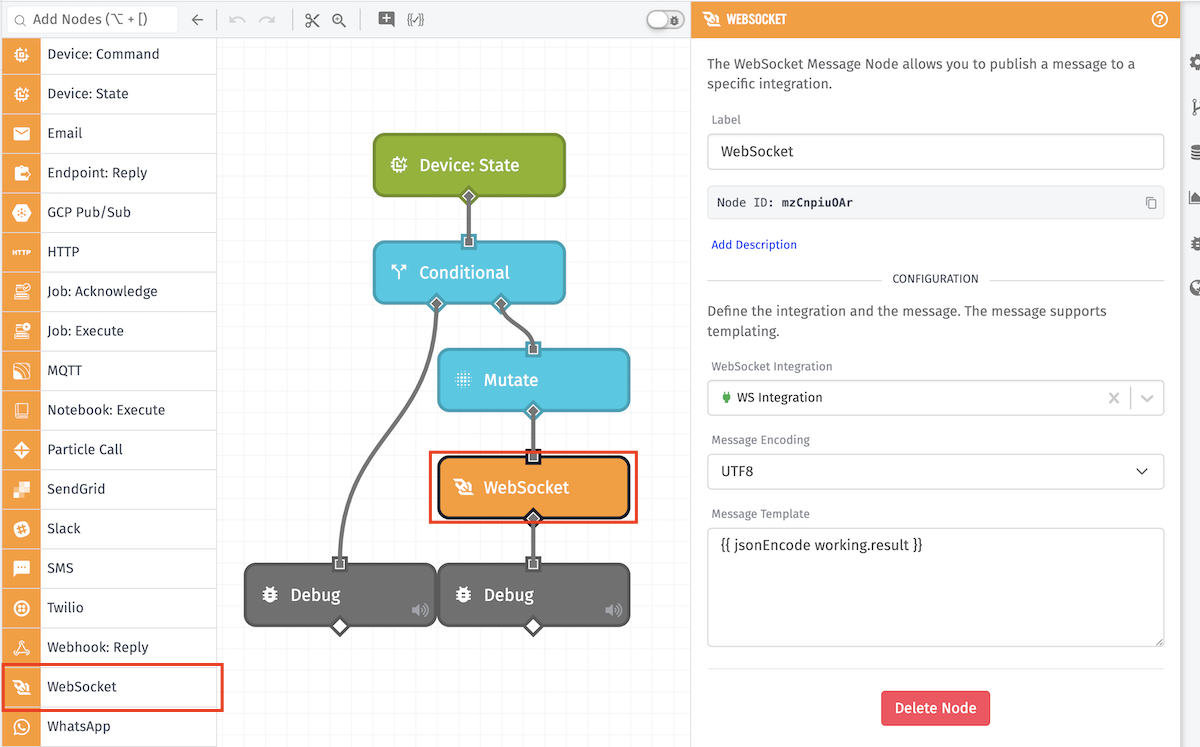
Configuration
The WebSocket Message Node takes three properties:
- WebSocket Integration: The WebSocket integration to which the message should be published. The integration must be connected for the node to successfully publish. The ID is templatable.
- Message Encoding: An encoding method for the message (defaults to UTF-8).
- Message Template: A string template for the message to publish to the integration. If you would like to publish an object or array, the value should be properly encoded.
Notes
There are a couple considerations to keep in mind when using the WebSocket Message Node ...
Integration Connection Status
The chosen WebSocket integration must be connected for the node to publish a message; invocations of this node while the integration is disconnected will not queue to send later.
Differences from Webhook Reply
The WebSocket Message Node should not be confused with the Webhook Reply Node. The WebSocket Message Node only publishes messages to a connected WebSocket integration, whereas the Webhook Reply Node can be configured to publish a message to clients connected to a WebSocket-type Webhook.
Encoding Structured Data
When using a string template to reference structured data in the message (such as objects or arrays), you must encode the data using a {{jsonEncode}} helper, which will stringify the object. Failure to do so will result in your message being published as "[object Object]".
Related Nodes
Was this page helpful?
Still looking for help? You can also search the Losant Forums or submit your question there.