JSON: Encode Node
The JSON: Encode Node allows you to encode a part of the payload into JSON (JavaScript Object Notation) format, and store that result on the payload for later use.
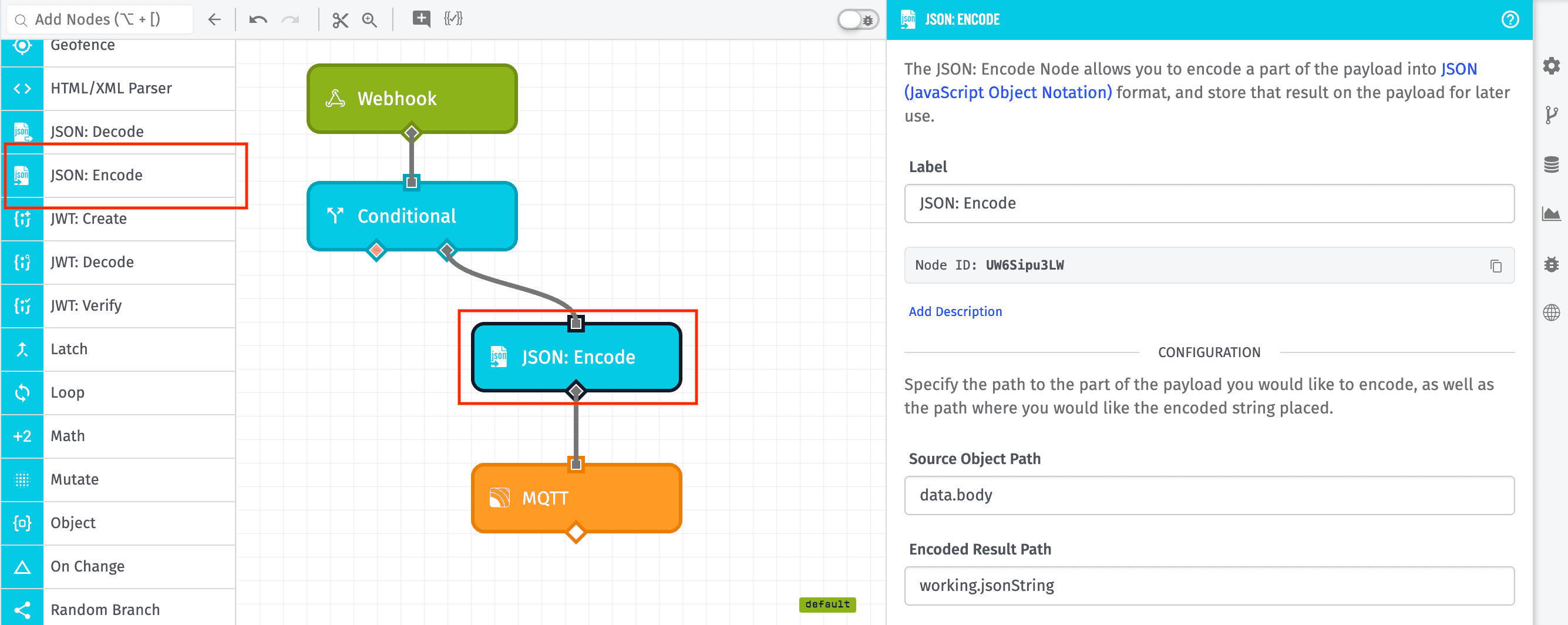
Node Properties
The JSON: Encode Node's configuration has a single section ...
Configuration
Define the data source and the destination for the result:
- Source Object Path: The payload path to the object to encode.
- Encoded Result Path: The payload path at which to store the result.
Note: It is possible for both paths to be the same, in which case the source will be replaced by the encoded JSON string.
Node Example
In the above example, the workflow will encode the value at the data.body path and place the resulting string at the working.jsonString path. So, for example, given the following payload:
{
  "time": Fri Feb 19 2016 17:26:00 GMT-0500 (EST),
  "data": {
    "body": {
      "messageBody": [
        12,
        24
      ],
      "messageName": "Trigger52"
    },
    ...
  },
  ...
}
The payload after execution of the JSON: Encode Node would look like:
{
  "time": Fri Feb 19 2016 17:26:00 GMT-0500 (EST),
  "data": {
    "body": {
      "messageBody": [
        12,
        24
      ],
      "messageName": "Trigger52"
    },
    ...
  },
  "working": {
    "jsonString": "{\"messageBody\":[12,24],\"messageName\":\"Trigger52\"}"
  },
  ...
}
Related Nodes
Was this page helpful?
Still looking for help? You can also search the Losant Forums or submit your question there.