Crypto: Sign Node
The Crypto: Sign Node generates an encrypted signature from a given private key and string of data.
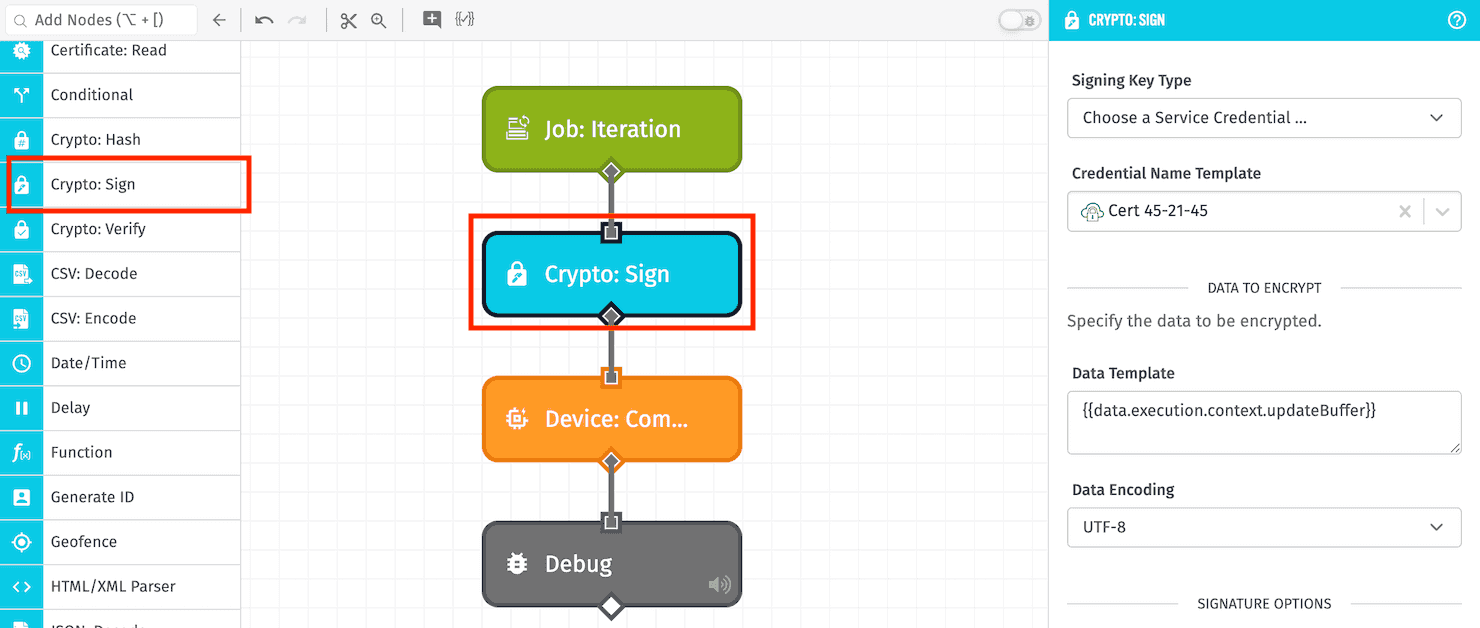
Node Properties
Configuration for the Crypto: Sign Node is broken up into the following sections ...
Configuration
First, choose how to provide the signing key by choosing a Signing Key Type. Options are:
- Credential Name Template: If selected, choose one of your application's Certificate / Key Pair Service Credentials to sign the provided data. This is recommended; however, this option is not available in Edge Workflows.
- Enter Local File Path Template: In Edge Workflows only, you may provide a file path to where the signing key is stored in a volume mounted within the agent's container.
- Enter String Template: If selected, provide a string template resolving to the signing key.
- Enter Payload Path: If selected, provide a payload path pointing to the signing key on the workflow payload.
For all options other than Credential Name Template, the signing key must be PEM encoded.
Data to Encrypt
Next, define the data to encrypt with your signing key:
- Data Template: Enter a string template for the data you wish to encrypt.
- Data Encoding: Provide the encoding of the provided data. Default is
UTF-8.
Signature Options
Next, specify options for generating the signature:
- Signature Output Encoding: Choose the encoding for the signature output. Default is
Base64. - Algorithm Type: Choose a cryptographic hash algorithm for generating the signature. Default is
SHA-256. - Padding: For the padding, choose either
RSA PKCS1(default) orRSA PSS. - DSA Encoding: For the Digital Signing Algorithm encoding, choose either
DER(default) orIEEE P1363.
Result Path
Finally, specify a Result Path for where to place the generated signature. If successful, the value placed at this payload path will be an object with a signature property. If the node fails, the value will be an error object with a message property giving a reason for the failure.
Node Example
Given a Crypto: Sign Node with the following configuration ...
- Signing Key Type:
Choose a Service Credential ... - Data Template:
{{working.myData}} - Data Encoding:
UTF-8 - Signature Output Encoding:
Base64 - Algorithm Type:
SHA-256 - Padding:
RSA PKCS1 - DSA Encoding:
DER - Destination Path:
working.signResult
... and a payload of the following ...
{
  "working": {
    "myData": "Hello, World!"
  }
}
... the following would be placed on the payload at the path of working.signResult:
{
  "signature": "JHtyj3waI+T0F452kJRlmXVxcrZs/UmliXS2yJOWesfKtf46+ewmy1V3N2pIqB71bAB8keyntuiRGlRf6TZitOcVaZ+rnYYptTlio9Bpj/mNQb1l2h8JAM+detBbTUbS6QfRUlnOgN7/wb8Ro8ST7glNIxEb2sa754+X4cLVLA8p2H9Fk0rKOiLMnlFi9/xb9rHh02wWn3xP2fc9ishz/BKZgCmK3TQfRO3b0gv0qMaqiB59EPs0heYcXCW9DgUynDqiier1oVwb48qURIFrW9rBaqvpcEth2PTJ89JxUzefHpJyrpq21fcVKdYsgEseOlhGweTD2Vcxud14UP8u1A=="
}
Node Errors
A common case where the Crypto: Sign Node would return an error would be if you attempted to use a public key - or an otherwise invalid private key - to sign the data. In such a case, the following would be placed on the payload at the Result Path:
{
  "error": {
    "message": "Key is invalid."
  }
}
Related Nodes
Was this page helpful?
Still looking for help? You can also search the Losant Forums or submit your question there.